
Quick answer
For noisy-office work calls, choose earbuds by microphone behavior, fit, connection reliability, and controls—not the Bluetooth number alone. ENC may help the other person hear you, while a secure passive fit affects what you hear. Confirm device compatibility, return terms, and call controls. The catalog candidate is worth considering only as a feature-based shortlist option, not proof of tested call quality.
Key takeaways
- ENC is generally a microphone-focused feature; it is not automatically the same as noise cancellation for the wearer.
- Bluetooth 5.3 describes a connection standard, but it does not guarantee clear calls, long range, or reliable multipoint switching.
- For office use, prioritize microphone documentation, comfort, controls, and return terms over headline battery claims.
- An IPX7 rating can help with moisture exposure, but it does not make earbuds ideal for every environment or cleaning method.
Wireless earbuds can look nearly identical on a product page while behaving very differently during a real workday. One pair may stay comfortable through several meetings, while another may create pressure, drop its connection when you move between rooms, or make your voice sound distant to the person on the other end.
That makes “Which earbuds are best?” the wrong starting question. A more useful question is: which features solve the specific problems of your calls, commute, desk setup, and listening habits? If your main challenge is taking calls in a shared office, airport lounge, or home with background noise, the comparison should focus on communication rather than workout durability or maximum bass.
Define the noisy-call problem before comparing models
Background noise affects both sides of a call. You need to hear the conversation, but the person you are speaking with also needs to hear your voice. Earbuds can address those problems through different mechanisms, and product descriptions often place them together.
- Microphone noise reduction: Features such as environmental noise cancellation, often abbreviated as ENC, are intended to reduce some surrounding sound picked up by the microphones. Their usefulness depends on microphone placement, software, wind, and the type of noise.
- Passive isolation: The earbud’s shape and eartip seal can reduce sound reaching your ears. A good fit may help with steady office noise even when the earbuds do not offer active noise cancellation.
- Active noise cancellation: ANC uses microphones and processing to reduce some external sound for the wearer. It is a different claim from microphone-side noise reduction and should not be assumed from the word “noise canceling” alone.
If your calls are mostly in a quiet private room, microphone quality and comfort may matter more than ANC. If you work beside conversations, air conditioning, or street noise, you should look for evidence about both what you hear and what callers hear from you.
Compare the features that matter for work calls
| Feature | What it can tell you | What it cannot guarantee |
|---|---|---|
| Bluetooth 5.3 | A newer Bluetooth specification with defined technical capabilities. | Perfect range, seamless switching, or better microphones in every design. |
| ENC | Some microphone-side processing intended to reduce environmental noise. | That your voice will sound natural in wind, crowds, or echoing rooms. |
| Battery claim | A stated playback figure under the seller’s testing conditions. | Actual call time, performance with high volume, or battery life after months of use. |
| IP rating | A standardized level of protection against specified water or solid-particle exposure. | Protection from every liquid, soap, sweat situation, impact, or charging mistake. |
| Touch controls | Potentially convenient mute, answer, or playback actions. | That controls will work consistently through hair, hats, accidental touches, or every calling app. |
The table’s main lesson is simple: specifications are clues, not outcomes. A Bluetooth version number is useful for identifying the advertised connection technology, but it does not replace information about the earbuds’ antenna design, software, phone compatibility, or call behavior.
Check compatibility and call controls before buying
Before comparing prices or colors, check whether the earbuds support the devices and apps you use. A pair can connect to a phone for music but still offer an awkward experience on a laptop, tablet, or workplace computer. Look for clear information about operating-system compatibility, call controls, microphone use, and whether both earbuds can operate independently.
Multipoint support can be valuable if you regularly move between a computer and phone, but do not assume that every Bluetooth 5.3 product includes it. If the listing does not clearly state multipoint or reliable device switching, treat that feature as unconfirmed. You may need to disconnect manually when a second device rings.
Also consider the controls you need most. Answering a call, ending a call, muting the microphone, changing volume, and activating a voice assistant are not equally available on every model. A product page that only says “touch control” does not explain which actions are assigned or whether controls can be customized.
Where the catalog candidate fits
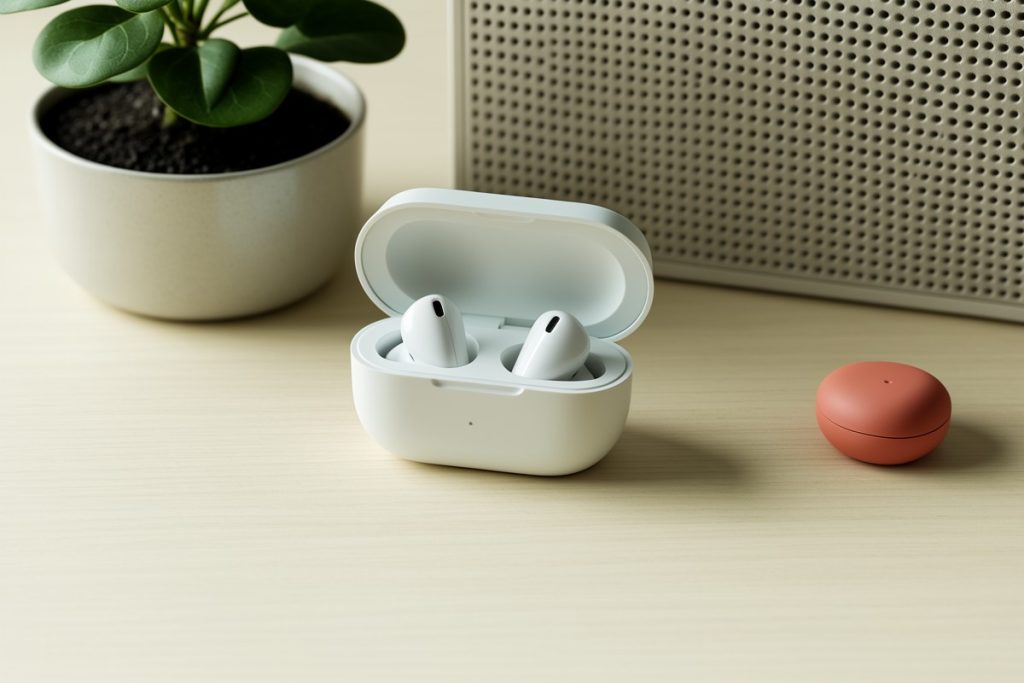
The approved catalog candidate is a reasonable feature-based option for readers who want one pair for calls, everyday listening, and occasional exercise. Its catalog description lists Bluetooth 5.3, ENC noise canceling, a stated 50-hour playback figure, an LED charging display, and an IPX7 rating.
Those details create a sensible shortlist, but they do not establish call quality. The ENC label may be useful if microphone-side noise reduction is your priority, yet the listing alone does not tell us how clearly your voice will sound in a busy office. The 50-hour figure should also be read as a stated playback claim rather than a promise of 50 hours of continuous calls. Charging-case capacity, volume, codec, call time, and usage patterns can change real-world results.
The white finish and water-resistance claim may suit someone who wants a simple pair for desk use and light activity. However, readers who need dependable conference calls should confirm the return policy and test the microphones promptly with their actual phone and computer. That is especially important because no independent hands-on testing evidence is provided here.
See the Wireless Earbuds Bluetooth 5.3 model as a candidate to investigate, not as a guaranteed solution. Compare its current listing details with your call app, devices, and workplace noise before deciding.
A practical pre-purchase checklist
- Write down the two devices you need to connect, such as a laptop and phone.
- Confirm whether multipoint switching is explicitly supported or plan to reconnect manually.
- Check whether the controls include answering and ending calls, and whether mute is handled by the earbuds or the app.
- Look for microphone details, not just “noise canceling” language.
- Choose the correct eartip size and confirm the return policy in case the seal or pressure is uncomfortable.
- Test one short call indoors and one in your usual noisy location before relying on the earbuds for important meetings.
Bottom line
The best wireless earbuds for noisy work calls are not necessarily the ones with the newest Bluetooth number, biggest battery claim, or most dramatic “noise canceling” wording. Start with the sound problem you need to solve, separate microphone features from listening features, and verify compatibility with your actual devices.
The catalog candidate makes sense as a low-complexity option to research because it combines the listed ENC, Bluetooth 5.3, battery, and water-resistance features in one product. Still, the honest buying decision depends on evidence the listing may not provide: microphone clarity, comfort over a full workday, connection behavior, and easy returns if the fit or call performance falls short.
Last reviewed: 2026-11-23